

Thunderbolt ports have become a staple in modern computing, offering high-speed data transfer, multi-functionality, and power delivery. Co-developed by Intel and Apple, Thunderbolt technology has revolutionized the way we connect and use devices. In this article, we’ll dive deep into the history, applications, advantages, and future trends of Thunderbolt ports.
The Origin of Thunderbolt Technology
Thunderbolt technology, introduced by Intel in 2011, was designed to create a unified, high-performance interface for computers. Its origins date back to 2009, when Intel began developing the technology under the codename “**Light Peak.**” The goal was to replace and consolidate the numerous, often inconsistent, expansion ports available on computers, including *SCSI*, *SATA*, *USB*, *FireWire*, and *PCI Express*.
By 2011, Intel had refined and rebranded the technology as “Thunderbolt,” signifying its high-speed capabilities and versatile functionality. **Apple** was an early adopter, integrating Thunderbolt into its MacBook Pro lineup, which helped propel the technology into mainstream use. With its exceptional speed, power delivery, and support for multiple protocols, Thunderbolt quickly set a new standard for connectivity in modern computing.
What is a Thunderbolt Port?
A Thunderbolt port is a high-speed input/output (I/O) interface that supports data transfer, video output, and power delivery through a single cable. The latest Thunderbolt versions use USB-C connectors, offering speeds of up to 40 Gbps and power delivery of up to 100W. Thunderbolt ports support multiple protocols, including PCI Express (PCIe), DisplayPort, and USB, allowing users to connect various devices, such as external storage, monitors, and docking stations, through one unified port.
Thunderbolt Evolution: A Brief History
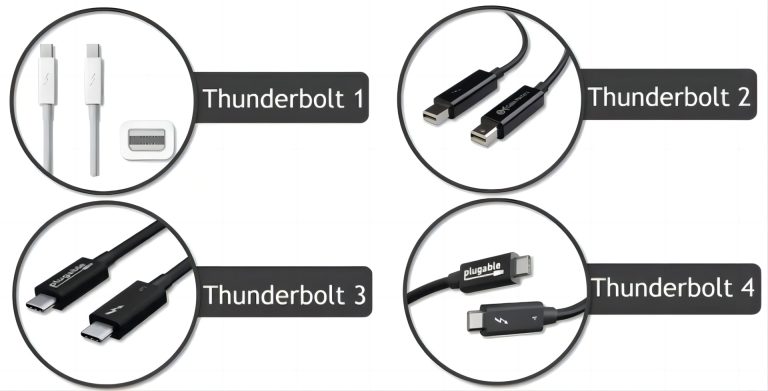
Thunderbolt 1 (2011): The Original Speedster
The first Thunderbolt version offered 10 Gbps data transfer speed and used the Mini DisplayPort connector. It combined PCI Express and DisplayPort into one cable, allowing for fast data transfer and video output.
Thunderbolt 2 (2013): Doubling the Power
Thunderbolt 2 improved on its predecessor by doubling the speed to 20 Gbps. It also added support for 4K video output, making it ideal for creative professionals working with high-resolution media.
Thunderbolt 3 (2015): A Game-Changer
Thunderbolt 3 introduced the USB-C connector, vastly improving versatility. With speeds of up to 40 Gbps, it supported 100W power delivery, dual 4K display output, and connection to external GPUs (eGPUs). This version also allowed daisy-chaining of up to six devices through a single port.
Thunderbolt 4 (2020): Enhanced Versatility and Security
While Thunderbolt 4 maintained the 40 Gbps speed of its predecessor, it introduced stricter minimum requirements, including support for dual 4K displays, 32 Gbps PCIe data transfer, and enhanced security features to prevent unauthorized access.
Thunderbolt vs. USB-C: What's the Difference?
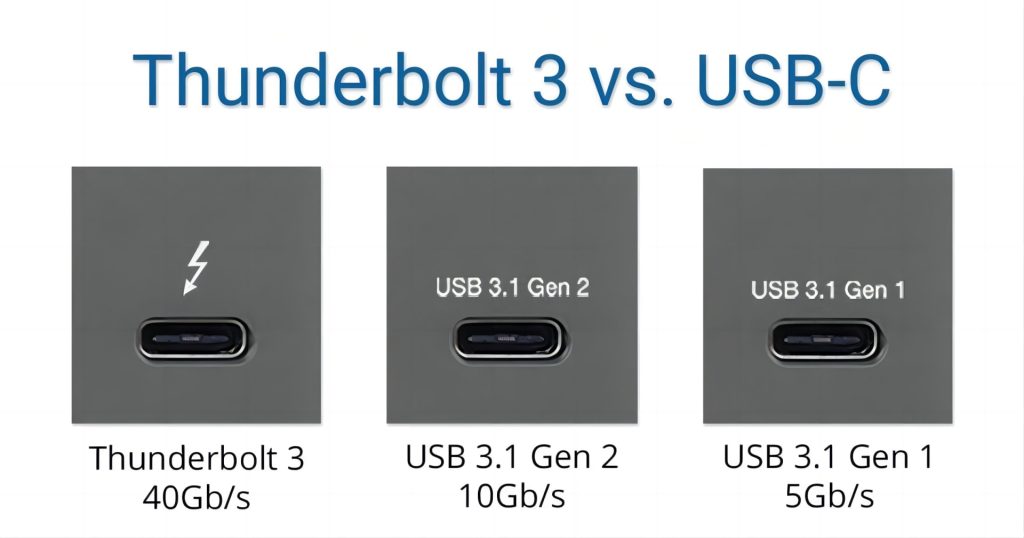
Thunderbolt is a transmission protocol that provides high-speed data transfer, video output, and power delivery.
Type-C, on the other hand, is a physical connector design. Starting with Thunderbolt 3, the Thunderbolt interface adopted the Type-C form factor, but not all Type-C ports support the Thunderbolt protocol.
Key Features of Thunderbolt Ports
High-Speed Data Transfer: Thunderbolt ports, especially versions 3 and 4, offer 40 Gbps speeds, making them ideal for transferring large files, such as high-resolution videos or complex data sets.
Multi-Protocol Support: Thunderbolt ports support multiple protocols, including PCIe, DisplayPort, and USB, offering a wide range of connectivity options.
Daisy-Chaining: With the ability to daisy-chain up to six devices, Thunderbolt simplifies the connection of multiple peripherals, such as monitors, storage devices, and docking stations, through a single port.
Power Delivery: Thunderbolt ports can deliver up to 100W of power, making them capable of charging laptops and other high-power devices. This feature is especially useful for docking stations, where a single cable can provide both power and connectivity.
Dual Display Support: Thunderbolt ports can support two 4K displays or a single 8K display, offering exceptional video output quality for professional and entertainment use.
Thunderbolt Port Applications
Professional Use:
- Video Editing: Thunderbolt’s high-speed data transfer and support for dual 4K displays make it a top choice for video editors who need to handle large files and work with high-resolution footage in real-time.
- Graphic Design: Connect multiple 4K monitors and high-speed external drives seamlessly to enhance productivity.
- Data-Intensive Applications: Scientists and data analysts rely on Thunderbolt for transferring large data sets quickly, connecting to external storage solutions like NVMe SSDs.
Consumer Use:
- Fast File Transfers: Transferring large amounts of data, such as HD movies or backups, becomes a quick task with Thunderbolt’s high transfer rates.
- Docking Stations: Thunderbolt docking stations offer a one-cable solution, connecting multiple peripherals like keyboards, monitors, and external drives.
- External GPUs (eGPUs): Gamers and content creators can use Thunderbolt to connect eGPUs to laptops, significantly boosting graphics performance for demanding applications.
Advantages of Thunderbolt Ports
- Unmatched Speed: Thunderbolt ports offer data transfer rates that surpass those of traditional USB ports, enabling seamless file transfers and high-speed connectivity.
- One Cable for Everything: From data transfer and video output to power delivery, Thunderbolt is a versatile all-in-one solution.
- Future-Proofing: Thunderbolt’s adaptability to various protocols (PCIe, DisplayPort) and support for emerging technologies (e.g., 8K displays) ensure it remains relevant in the evolving tech landscape.
Why Choose Thunderbolt Over USB or HDMI?
Thunderbolt ports offer superior speed, multi-protocol support, and power delivery compared to standard USB or HDMI ports. For users requiring high-speed data transfer, multi-monitor setups, or a docking station solution, Thunderbolt is the optimal choice.
Thunderbolt™ 5 – the next generation
In September 2023, Intel announced **Thunderbolt™ 5**, the next generation of Thunderbolt technology, and showcased a prototype laptop and dock. Thunderbolt 5 promises significant improvements in both speed and bandwidth, bringing enhanced connectivity benefits to computer users.Thunderbolt 5 is poised to be the next breakthrough in high-speed connectivity. Building on the foundations of Thunderbolt 4, it promises 80 Gbps transfer speeds, doubling the bandwidth of its predecessor. This massive speed boost will enable even more seamless support for multiple high-resolution displays, faster data transfers for large files, and enhanced external GPU performance. Additionally, Thunderbolt 5 is expected to improve power delivery, supporting the charging of more power-hungry devices. With these advancements, Thunderbolt 5 is set to redefine the future of connectivity, catering to the growing demands of high-performance computing and media-rich applications.

Common Questions About Thunderbolt Ports?
Q: Can I use a Thunderbolt port for charging my laptop?
A: Yes! Thunderbolt ports can deliver up to 100W of power, allowing them to charge most laptops efficiently.
Q: Is Thunderbolt 4 compatible with USB-C devices?
A: Absolutely! Thunderbolt 4 uses the USB-C connector and is compatible with all USB-C devices, though it offers additional features like faster speeds and dual 4K display support.
Please refers to about more information about Thunderbolt5: <br><br> https://www.intel.com/content/www/us/en/newsroom/news/intel-introduces-thunderbolt-5-standard.html


